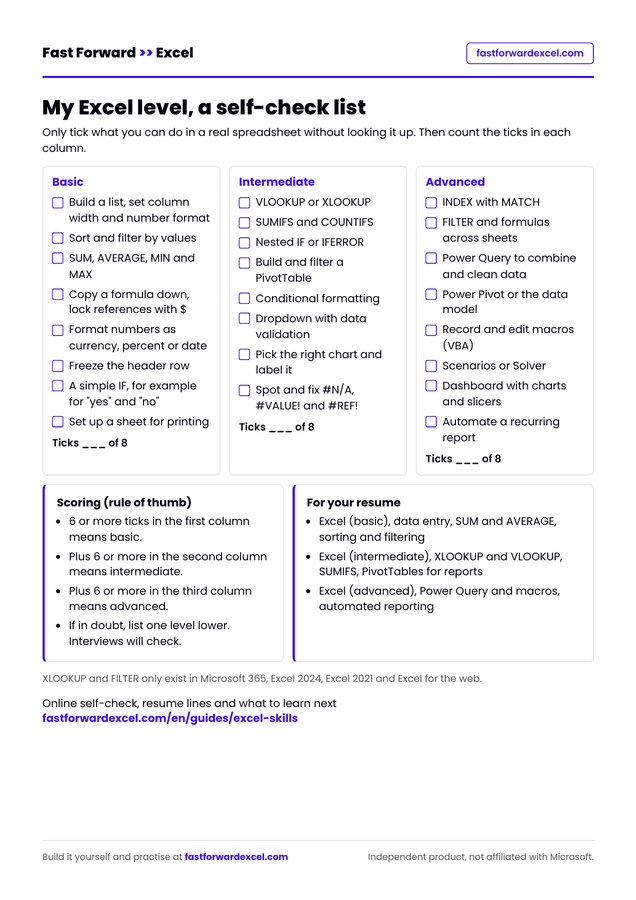
There is no fixed scale for Excel skills, but most employers mean three levels. Basic means you can sum, sort and filter a list. Intermediate means you look up data with XLOOKUP or VLOOKUP, use SUMIFS and build PivotTables. Advanced means you automate reports with Power Query or macros. Only list what you can show in a test.
Job ads ask for "strong Excel skills" or "advanced Excel" and rarely say what that means. The clearest way to read the levels is by the tasks you do at work. The functions behind them are just the proof.
| Basic | Intermediate | Advanced |
|---|
| Typical tasks | Build and update a list, add up a column, work out an average, sort and filter, simple chart, print | Pull data from a second list, total and count sales by region, dropdown for input, summary with a PivotTable, fix error messages | Automate reports, combine and clean data from several sources, models and dashboards |
| Functions | SUM, AVERAGE, MIN / MAX, COUNT, ROUND, simple IF, $ references | VLOOKUP, XLOOKUP, SUMIFS, COUNTIFS, nested IF, IFERROR | INDEX with MATCH, FILTER, formulas across sheets and files |
| Tools | Number formats, freeze panes, sort, filter, format as table | PivotTable, conditional formatting, data validation (dropdown), picking the right chart | Power Query, Power Pivot, macros (VBA), scenarios and Solver |
Two notes on the table. XLOOKUP and FILTER only exist in Microsoft 365, Excel 2024, Excel 2021 and Excel for the web. If your employer runs Excel 2019 or older, VLOOKUP or INDEX with MATCH is what counts there. And basic does not mean weak. Someone who sorts, filters and uses $ references correctly is already a real help in any office.
You can look up every function name in English, German and French in our list of Excel functions.
Where guides disagree
Read a few career guides and you will notice that everyone draws the lines a little differently. We compared 15 guides in English, German and French, and three points come up again and again.
- PivotTables. Most guides put them at the intermediate level. Some training providers only list them under advanced or expert. We follow the majority.
- VLOOKUP. Most guides call it intermediate, one French provider already calls it advanced. It is so common at work that employers expect it at the intermediate level.
- IF and macros. A simple IF sits under basic in some guides and one level up in others. A few guides already count simple macros as intermediate.
What does that mean for you? Add concrete functions and tasks to your resume. Then nobody has to guess what you mean by "advanced".
Self-check with 10 questions
The self-check takes about two minutes. You do not need an email address and nothing is saved. Only tick what you can do without looking it up.
The result is a rule of thumb. Whether you can really do something only shows when you type it into a real spreadsheet.
How to list Excel skills on your resume
Put Excel in your skills section. A simple pattern works best, the level, two or three functions as proof and what you used them for. If in doubt, go one level lower, because a test or interview question will follow.
| Level | Resume line |
|---|
| Basic | Excel (basic), data entry, SUM and AVERAGE, sorting and filtering, simple charts |
| Intermediate | Excel (intermediate), XLOOKUP and VLOOKUP, SUMIFS, PivotTables for weekly sales reports |
| Advanced | Excel (advanced), Power Query and macros, automated monthly reporting |
| With a test result | Fast Forward Excel skills test, level [your level], [your score] out of 1000, [month and year] |
In your work experience, one bullet with a real task says more than an adjective, for example "Built a PivotTable report in Excel that replaced a manual weekly summary."
Skip empty phrases like "proficient in Microsoft Office" without an example. And never claim a level you could not show in a test.
How employers test Excel skills
Many employers do not take the resume line on trust. Three methods are common.
- Online assessment before the interview. You get a link with questions or small tasks, often with a time limit.
- A live task. In the interview you get a spreadsheet and are asked to total sales by month or fill in a list with XLOOKUP.
- Interview questions. For example "How would you find duplicate entries?" or "What do you do when you see #N/A?"
To prepare, practise the tasks from your target column in a real spreadsheet, not just in your head. Read up on the common Excel error values and their causes, because that is a favourite interview topic.
Ways to prove your level
If you want to back up your level, you have several options. They differ in effort and in how well employers know them.
| Proof | What it shows | Good to know |
|---|
| Microsoft Office Specialist (MOS) Excel | an exam by Microsoft on Excel | taken at a test center |
| ICDL (spreadsheet module) | basic to intermediate skills | exam at a test center, there is also an advanced spreadsheet module |
| Course certificate | that you took a course | says little about what you can do today |
| Work sample | a spreadsheet or report you built | strong in an interview if you can explain it |
| Our Excel test | your level on real tasks in a spreadsheet | in preparation, see below |
We are building our Excel test right now. It checks real tasks by the result in the spreadsheet, not multiple choice. It covers the basic and intermediate levels, PivotTables are not part of it yet. Our test is not a certificate like MOS or ICDL and does not replace an exam with one of these providers. It gives you an honest picture of where you stand that you can mention on your resume.
What to learn next, in order
Learn in this order and each step builds on the one before.
- A clean list, create a spreadsheet with columns, totals and formatting.
- Calculations without surprises, sum, average and round, plus $ references.
- Let Excel decide, the IF function with AND and OR.
- Connect data, VLOOKUP and then XLOOKUP.
- Summarize, SUMIFS, COUNTIFS and the PivotTable.
- Read errors, spot and fix #N/A, #VALUE! and #REF!.
You learn fastest when you type each function yourself and see right away whether the result is correct. That is what our Excel exercises are for.
Printable checklist
Prefer paper? The checklist sums up all three levels on one A4 page, with scoring and the resume lines.